Primary Units — Projects
Overview
The Projects section lists all developer projects you have access to. Each project is organized into Phases, and each phase contains Unit Types with the actual units available for sale.
The Projects List
Projects are displayed as cards. Each card shows the project name and three action buttons:
| Button | Description |
|---|---|
| Phases (🏠 icon) | Opens the project's phases. |
| Units (icon) | Goes directly to the unit types inside this project. |
| Edit (✏️ icon) | Edit the project details. |
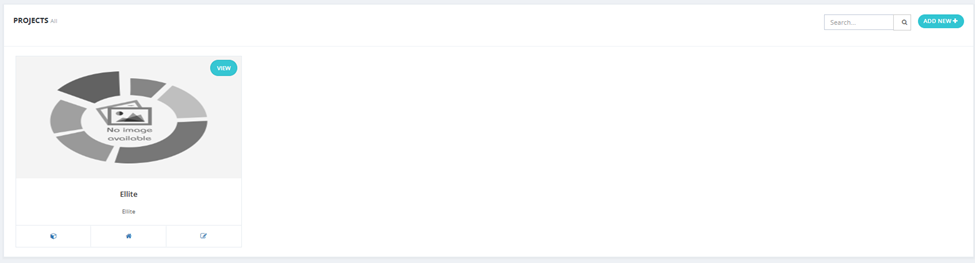
Available actions: Search, Add New +.
Adding a Project
Click Add New + and fill in the following fields:
| Field | Required | Description |
|---|---|---|
| Developer Name | ✅ | The developer company this project belongs to. |
| Name | ✅ | Project name. |
| Start Price From | ✅ | Starting price for units in this project. |
| Description | ✅ | Project description. |
| About | Optional | Additional information about the project. |
| Location | ✅ | Project location — searchable on map with lat/lon. |
| Payment Systems | ✅ | Available payment methods. |
| Prices Range | Optional | Price range for units. |
| Maintenance | Optional | Maintenance fees (EGP). |
| Finishing | Optional | Finishing type (e.g., finished). |
| Down Payment | Optional | Down payment percentage or amount. |
| Duration Months | Optional | Payment duration in months. |
| Delivery Date | ✅ | Expected delivery date. |
| Code | ✅ | Project code. |
| Purpose | Optional | Investment / Housing / For Children / Vacation. |
| Facilities | Optional | Available facilities (e.g., Garage, Club). |
| Building Area | Optional | Total building area. |
| Tags | Optional | Tags for categorization. |
| Files | Optional | Attach documents. |
| Videos | Optional | Attach video links. |
| Gallery | Optional | Upload project photos. |
| Logo | Optional | Project logo or featured image. |
Filters
| Filter | Description |
|---|---|
| Price | Filter by price range (From / To). |
| Location | Filter by location. |
Project Phases
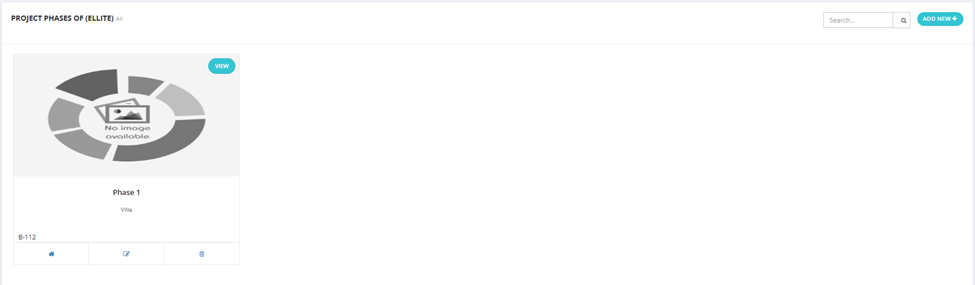
Clicking the Phases button on a project card opens the Project Phases screen, showing all phases within that project as cards with:
- Phase name and tag.
- Three action buttons: Units (opens unit types in this phase), Edit, Delete.

Adding a Phase
Click Add New + and fill in:
| Field | Required | Description |
|---|---|---|
| Name | ✅ | Phase name. |
| Tag | Optional | A tag for this phase. |
| Details | ✅ | Phase details. |
| Description | ✅ | Phase description. |
| Purpose | Optional | Investment / Housing / For Children / Vacation. |
| Facilities | Optional | Available facilities in this phase. |
| Files | Optional | Attach documents. |
| Videos | Optional | Attach video links. |
| Gallery | Optional | Upload phase photos. |
| Logo | Optional | Phase logo or featured image. |