Resale — Resale Units Table & History
Overview
The Resale section has two additional views beyond the card view — the Resale Units Table and the Resale Units History. Both give you different ways to review and audit resale unit data.
Resale Units Table
The Resale Units Table displays the exact same data as the Resale Units card view, but in a spreadsheet-style table format — useful for reviewing many units at once or exporting data.
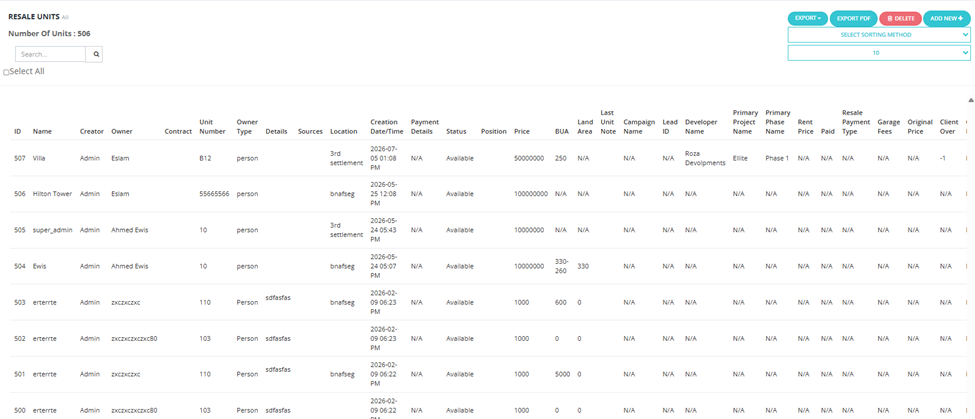
Columns
| Column | Description |
|---|---|
| ID | Internal unit ID. |
| Name | Unit name/title. |
| Creator | The user who created the listing. |
| Owner | The owner of the unit. |
| Contract | Contract reference, if any. |
| Unit Number | Unit or apartment number. |
| Owner Type | Type of owner (e.g., Person). |
| Details | Unit description. |
| Sources | Lead source attached to this listing. |
| Location | Unit location. |
| Creation Date/Time | When the listing was created. |
| Payment Details | Payment method and terms. |
| Status | Current status (e.g., Available). |
| Position | Unit position. |
| Price | Asking price. |
| BUA | Built-up area. |
| Land Area | Land area (if applicable). |
| Last Unit Note | Most recent note on the unit. |
| Campaign ID / Lead ID | Marketing info. |
| Developer Name | Associated developer. |
| Primary Project Name / Phase Name | Primary project and phase. |
| Rent Price / Paid / Resale Payment Type | Financial details. |
| Garage Fees / Original Price / Client Over / Club Fees | Additional financial fields. |
Available actions: Export, Export PDF, Delete, Add New +, Select Sorting Method, Search.
The same filters from the Resale Units card view apply here.
Resale Units History
The Resale Units History tab provides a full audit log of all actions taken on all resale units.
What You See
| Column | Description |
|---|---|
| Client | The client associated with the action. |
| User | The CRM user who performed the action. |
| Unit | The resale unit the action was performed on. |
| Action | The type of action (e.g., Show, Created, Reference number changed, Field updated). |
| Action Date | The date the action took effect. |
| Note | Any note recorded with the action. |
| Creation Date/Time | When the action was logged. |
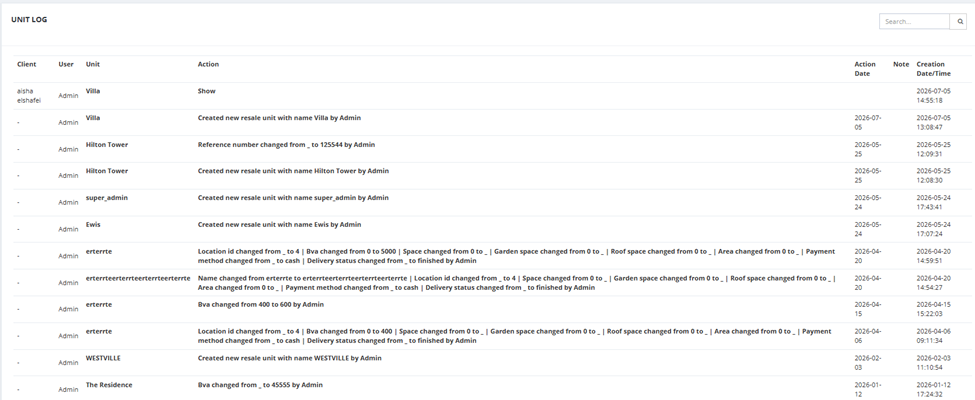
Available action: Search.
Available Filters
| Filter | Description |
|---|---|
| Date | Filter by date range (From / To). |
| Project | Filter by project. |
| Unit | Filter by unit name. |
| Owner | Filter by owner. |
| State | Filter by pipeline state. |
| Client | Filter by client name. |
💡 Use Resale Units History to investigate the full lifecycle of a specific unit — from the moment it was created to every edit, show, and deal stage it went through.