SMS Logs
Overview
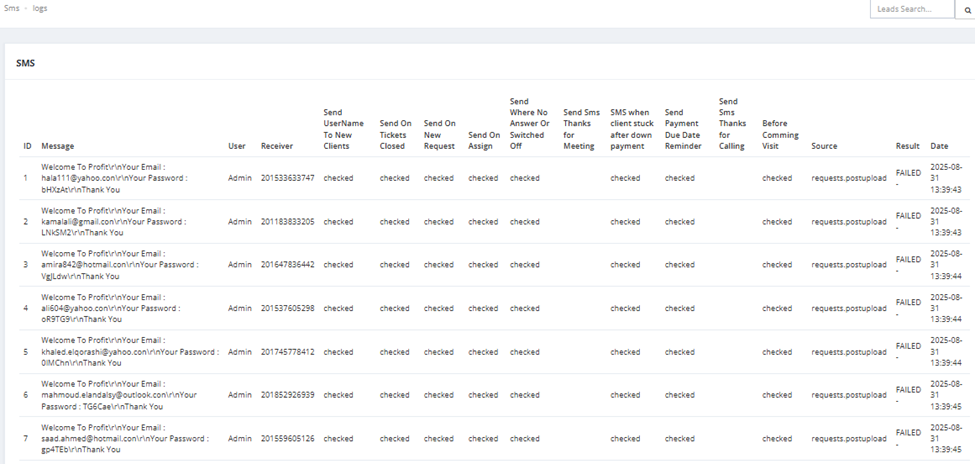
SMS Logs records every SMS message sent through the CRM — showing the message content, who sent it, who received it, what triggered it, whether it was delivered, and when. Accessible from Roles & Users → SMS Logs.
What You See
| Column | Description |
|---|---|
| ID | Sequential log ID. |
| Message | The full content of the SMS sent. |
| User | The CRM user who triggered the SMS. |
| Receiver | The phone number the SMS was sent to. |
| Send Username To New Clients | Checked if this SMS was triggered by the "send credentials to new clients" event. |
| Send On New Tickets Closed | Checked if triggered when a ticket is closed. |
| Send On New Request | Checked if triggered when a new request is created. |
| Send On Assign | Checked if triggered when a lead is assigned. |
| Send Where No Answer Or Switched Off | Checked if triggered when a client is unreachable. |
| Send SMS Thanks for Meeting | Checked if triggered after a meeting. |
| SMS When Client Stuck After Down Payment | Checked if triggered when a client stalls after down payment. |
| Send Payment Due Date Reminder | Checked if triggered as a payment due date reminder. |
| Send SMS Thanks for Coming Visit | Checked if triggered after a client visit. |
| Before Coming Visit | Checked if triggered before a scheduled client visit. |
| Source | The system event or source that triggered this SMS (e.g., requests.postupload). |
| Result | Whether the SMS was delivered successfully or failed (e.g., FAILED). |
| Date | Date and time the SMS was sent. |
💡 Use SMS Logs to verify that notification messages are being sent and delivered correctly, or to investigate delivery failures.