
Saved NPV Plans
Overview
Once a payment plan has been validated and saved through the NPV Editor, it becomes a Saved NPV Plan linked to the unit. It can be viewed, edited, or deleted from the Unit Details screen.
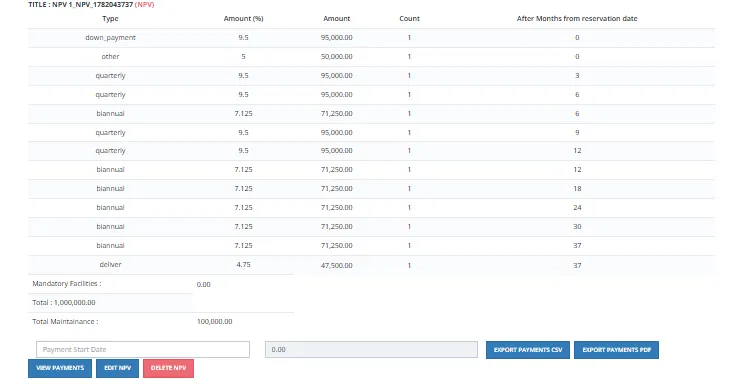
What a Saved NPV Plan Shows
A saved plan displays the full installment schedule with the following details:
| Field | Description |
|---|---|
| Title | The plan name, including the NPV identifier (e.g., "NPV 1 — NPV_1782043737 (NPV)"). |
| Type | Payment type for each row (e.g., down_payment, quarterly, biannual, other, deliver). |
| Amount (%) | Each installment as a percentage of the total unit price. |
| Amount | The installment amount in EGP. |
| Count | Number of installments of this type. |
| After Months from reservation date | When this installment is due, counted from the reservation date. |
| Mandatory Facilities | Any mandatory facility costs added to the plan. |
| Total | The total unit price. |
| Total Maintenance | Total maintenance fees. |
Available Actions on a Saved Plan
| Button | Description |
|---|---|
| View Payments | Opens the full payment schedule with dates and amounts. |
| Edit NPV | Re-opens the NPV Editor to adjust the plan. Requires re-validation after any changes. |
| Delete NPV | Removes the saved NPV plan. |
| Export Payments CSV | Exports the payment schedule as a CSV file. |
| Export Payments PDF | Exports the payment schedule as a PDF. |
How the Saved Plan Connects to the Pipeline
Once saved, this NPV plan is the payment plan used when the unit is reserved. When the salesman proceeds to reserve the unit for this client, the plan flows into the Unit Sales Pipeline at the Hold step — it becomes the active payment schedule that Finance collects against throughout the contract lifecycle.
⚠️ If the NPV plan is edited after the unit has already entered the pipeline, re-validation is required and any override decisions are re-recorded.