
NPV Comparison
Overview
The NPV Comparison screen shows a side-by-side comparison of the original payment plan and the edited plan, with a calculated Verdict showing whether the edited plan is financially equivalent, better, or worse than the original.
What You See
The screen is divided into three panels:
| Panel | Description |
|---|---|
| Original Plan NPV | The NPV figures for the unedited template plan. |
| Edited Plan NPV | The NPV figures for the plan after the salesman's adjustments. |
| Verdict | The final assessment — whether the change is acceptable or results in a loss. |
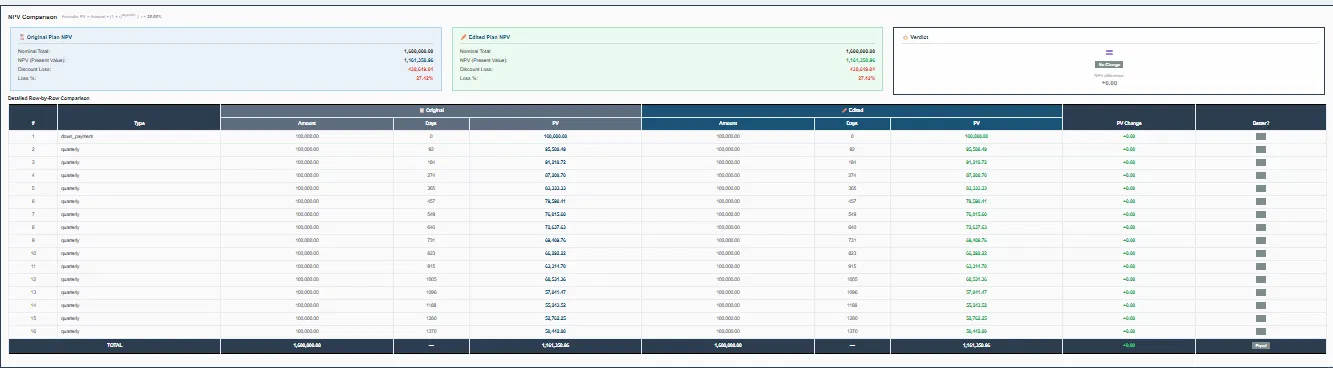
NPV Figures (shown for both Original and Edited)
| Field | Description |
|---|---|
| Nominal Total | The sum of all payments (should equal the unit price). |
| NPV (Present Value) | The true value of all payments in today's money, calculated using the project's discount rate. |
| Discount Loss | The difference between the Nominal Total and the NPV — represents the value lost due to the time value of money. |
| Loss % | The discount loss as a percentage of the Nominal Total. |
Detailed Row-by-Row Comparison
Below the summary panels, a detailed table shows every installment with:
| Column | Description |
|---|---|
| # | Installment number. |
| Type | Payment type (e.g., down_payment, quarterly, biannual, deliver). |
| Amount (Original) | The original installment amount. |
| Days (Original) | Days from the start date to this installment's due date. |
| PV (Original) | Present value of this installment in the original plan. |
| Amount (Edited) | The edited installment amount. |
| Days (Edited) | Days from the start date in the edited plan. |
| PV (Edited) | Present value of this installment in the edited plan. |
| PV Change | The difference in present value between original and edited. |
| Owner? | Indicates ownership or assignment of the installment. |
The Verdict
The Verdict panel shows the net result of all changes:
- No Change — the edited plan has the same NPV as the original.
- NPV difference — shown as a positive (gain) or negative (loss) amount in EGP.
💡 A positive PV Change means the edited plan collects more value earlier — better for the company. A negative PV Change means payments were pushed later, reducing their present value — a loss.