
Document Word
Overview
Document Words are placeholder codes inserted into contract templates. When a document is downloaded, the system automatically replaces each code with real data pulled from the relevant record — the reserved unit, the client, the project, etc.
There are two types of Document Words: Static and Dynamic.
The columns in each table indicate which document types the code is compatible with:
- EOI — usable in EOI document templates
- Res — usable in Reservation Form templates
- Con — usable in Contract templates
- Bro — usable in Broker Contract templates
⚠️ Using a code in the wrong document type will cause it to appear as plain text — it will not be replaced with any data.
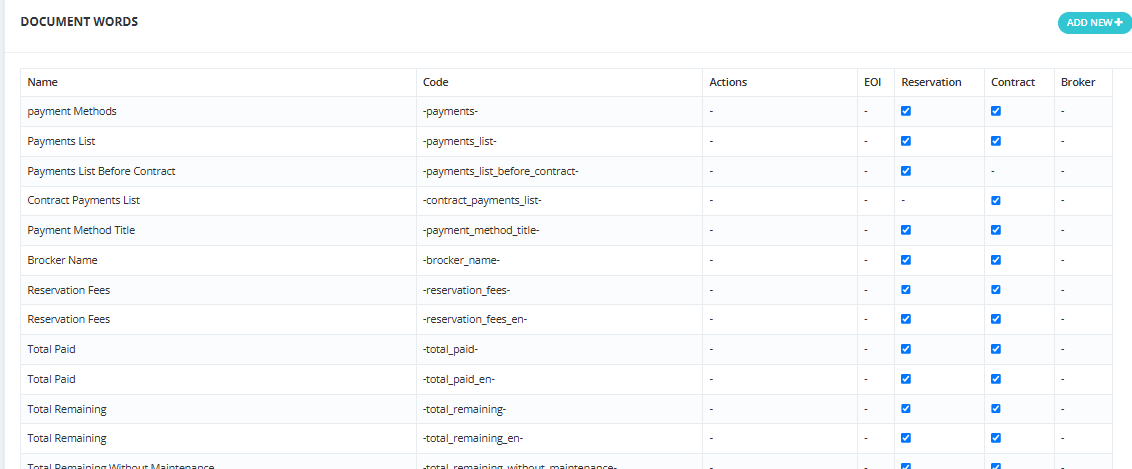
Static Document Words
Payment Plan Structure Codes
| Name | Code | What It Outputs | EOI | Res | Con | Bro |
|---|---|---|---|---|---|---|
| Payment Methods | -payments- |
A summary table of the payment plan structure — showing Type, %, Amount, Count, and After Months from reservation date. Example: down_payment 10% / 738,050 / 1 / 0 months. | ✅ | ✅ | ||
| Payments List | -payments_list- |
The full installment schedule — every payment row with Type, Amount, and Due Date. Includes reservation fees, down payment, quarterly installments, and maintenance. | ✅ | ✅ | ||
| Payments List Before Contract | -payments_list_before_contract- |
Only the installments due before the contract stage (reservation fees and down payment). Does not include ongoing quarterly installments. | ✅ | |||
| Contract Payments List | -contract_payments_list- |
A detailed financial breakdown table showing: Unit Original Price, Unit Price After Discount, Unit Price With Facilities, Total Price, Payment Terms, Project Name, Unit No, Floor, Unit Type, Finishing Type — followed by all installment rows with #, Payment Name, Due Percent, Due Amount, Due Date. Also shows Total Price, Maintenance rows, and Total Price With Maintenance. | ✅ | |||
| Payment Method Title | -payment_method_title- |
The title/name of the selected payment plan (e.g., "x" as shown in the payment terms field). | ✅ | ✅ | ||
| Facilities | -facilities- |
A list of all facilities added to this unit's sale with: Name, Percentage, Count, Period Per Month, Start Date. Shows "No Facility Selected!" if none added. | ✅ | ✅ |
Financial Amount Codes
💡 Codes without
_ensuffix output the amount written as Arabic text. Codes with_enoutput written as English text. Codes starting with-num_output a plain number (e.g., 738,050.25).
| Name | Code | What It Outputs | EOI | Res | Con | Bro |
|---|---|---|---|---|---|---|
| Broker Name | -brocker_name- |
The name of the broker company associated with this sale (e.g., "Ally Invest"). | ✅ | ✅ | ||
| Reservation Fees | -reservation_fees- |
Reservation fees written as Arabic text (e.g., "عشرون ألف جنيه فقط لا غير"). | ✅ | ✅ | ||
| Reservation Fees (English) | -reservation_fees_en- |
Reservation fees written as English text (e.g., "Twenty thousand pounds only"). | ✅ | ✅ | ||
| Reservation Fees (Number) | -num_reservation_fees- |
Reservation fees as a number (e.g., 20,000.00). | ✅ | ✅ | ||
| Reservation Fees Payment Way | -reservation_fees_payment_way- |
The payment method used for reservation fees (e.g., Cheque, Cash, Transfer). | ✅ | ✅ | ||
| Reservation Fees with EOI | -num_reservation_fees_with_eoi- |
Reservation fees plus the EOI amount already collected, as a number (e.g., 20,000.00). | ✅ | ✅ | ||
| Reservation Fees with EOI (English) | -num_reservation_fees_with_eoi_en- |
Same as above, written as English text (e.g., "twenty thousand EGP"). | ✅ | ✅ | ||
| Reservation Fees with EOI (Arabic) | -num_reservation_fees_with_eoi_ar- |
Same as above, written as Arabic text (e.g., "عشرون ألف جنيها"). | ✅ | ✅ | ||
| Total Paid | -total_paid- |
Total amount paid so far, written as Arabic text. | ✅ | ✅ | ||
| Total Paid (English) | -total_paid_en- |
Total amount paid so far, written as English text (e.g., "Seven hundred and thirty-eight thousand and fifty pounds and twenty-five cents only"). | ✅ | ✅ | ||
| Total Paid (Number) | -num_total_paid- |
Total amount paid so far, as a number (e.g., 738,050.25). | ✅ | ✅ | ||
| Total Remaining | -total_remaining- |
Total remaining amount (including maintenance), written as Arabic text. | ✅ | ✅ | ||
| Total Remaining (English) | -total_remaining_en- |
Total remaining amount (including maintenance), written as English text (e.g., "Seven million, three hundred and eighty thousand, five hundred and three pounds only"). | ✅ | ✅ | ||
| Total Remaining (Number) | -num_total_remaining- |
Total remaining amount, as a number (e.g., 7,380,503.00). | ✅ | ✅ | ||
| Total Remaining Without Maintenance | -total_remaining_without_maintenance- |
Remaining amount excluding maintenance fees, written as Arabic text. | ✅ | ✅ | ||
| Total Remaining Without Maintenance (English) | -total_remaining_without_maintenance_en- |
Remaining amount excluding maintenance, written as English text (e.g., "Six million, six hundred and forty-two thousand, four hundred and fifty-two pounds and seventy cents only"). | ✅ | ✅ | ||
| Total Remaining Without Maintenance (Number) | -num_total_remaining_without_maintenance- |
Remaining amount excluding maintenance, as a number (e.g., 6,642,452.70). | ✅ | ✅ | ||
| Total Remaining in Reservation | -total_remaining_res- |
Remaining amount at the reservation stage, as a placeholder code (not yet replaced with value in test). | ✅ | |||
| Total Remaining in Reservation (English) | -total_remaining_res_en- |
Same as above in English. | ✅ | |||
| Total Remaining in Reservation (Number) | -num_total_remaining_res- |
Same as above as a number. | ✅ | |||
| Total Amount | -total_amount- |
The total contract amount (unit price + maintenance), written as Arabic text (e.g., "ثمانية ملايين و مائة و ثمانية عشر ألف..."). | ✅ | ✅ | ||
| Total Amount (English) | -total_amount_en- |
Total contract amount written as English text (e.g., "Eight million, one hundred and eighteen thousand, five hundred and fifty-three pounds and twenty-five cents only"). | ✅ | ✅ | ||
| Total Amount (Number) | -num_total_amount- |
Total contract amount as a number (e.g., 8,118,553.25). | ✅ | ✅ | ||
| Deal Price | -deal_price- |
The agreed deal price (after discount), written as Arabic text. | ✅ | ✅ | ||
| Deal Price (Number) | -num_deal_price- |
The agreed deal price as a number (e.g., 7,380,502.50). | ✅ | ✅ | ||
| Remaining Down Payment | -remaining_down_payment- |
The remaining down payment not yet paid. | ✅ | ✅ | ||
| Maintenance Fees | -maintenance- |
Total maintenance fees written as Arabic text. | ✅ | ✅ | ||
| Maintenance Fees (English) | -maintenance_en- |
Total maintenance fees written as English text (e.g., "Seven hundred and thirty-eight thousand and fifty pounds and thirty cents only"). | ✅ | ✅ | ||
| Maintenance Fees (Number) | -num_maintenance- |
Total maintenance fees as a number (e.g., 738,050.30). | ✅ | ✅ | ||
| Payment Method Down Payment | -payment-method-down-payment- |
The down payment amount as defined in the payment plan template, written as Arabic text (e.g., "عشرة آلاف جنيه فقط لا غير"). | ✅ | |||
| Payment Method Down Payment (English) | -payment-method-down-payment-en- |
The down payment amount as defined in the payment plan template, written as English text (e.g., "Ten thousand pounds only"). | ✅ | |||
| Payment Method Down Payment (Number) | -num-payment-method-down-payment- |
The down payment as defined in the payment plan template, as a number (e.g., 10,000.00). | ✅ | |||
| Down Payment | -down_payment- |
The down payment amount written as Arabic text (e.g., "سبعمئة و ثمانية وثلاثون ألف و خمسون جنيه و خمسة وعشرون قرشاً فقط لا غير"). | ✅ | ✅ | ||
| Down Payment (English) | -down_payment_en- |
The down payment written as English text (e.g., "Seven hundred and thirty-eight thousand and fifty pounds and twenty-five cents only"). | ✅ | ✅ | ||
| Down Payment (Number) | -num_down_payment- |
The down payment as a number (e.g., 738050.25). | ✅ | ✅ | ||
| Down Payment Payment Way | -down_payment_payment_way- |
The payment method used for the down payment. | ✅ | ✅ | ||
| Reservation Serial Number | -reservation_serial_number- |
The auto-generated serial number for this reservation. The serial is configured at the project level — if the project field for this is not set, the code will not appear. | ✅ | ✅ | ||
| Dropping (Number) | $...$ |
Converts a number placed between the delimiters into written Arabic text. Example: $1000$ → "ألف". |
✅ | ✅ | ✅ | |
| Dropping English (Number) | $_en...$_en |
Converts a number placed between the delimiters into written English text. Example: $_en1000$_en → "one thousand". |
✅ | ✅ | ✅ |
Date & Time Codes
| Name | Code | What It Outputs | EOI | Res | Con | Bro |
|---|---|---|---|---|---|---|
| Day | -day- |
The day name when the document is generated, in Arabic (e.g., "الإثنين"). | ✅ | ✅ | ✅ | |
| Day (English) | -day_en- |
The day name when the document is generated, in English (e.g., "Monday"). | ✅ | ✅ | ✅ | |
| Date | -date- |
The full date when the document is generated (e.g., "2026-07-06"). | ✅ | ✅ | ✅ | |
| Contract Day | -c_day- |
The day name from the Contract Date field entered during Hold/Reservation, in Arabic (e.g., "الإثنين"). | ✅ | ✅ | ||
| Contract Day (English) | -c_day_en- |
The day name from the Contract Date field, in English (e.g., "Monday"). | ✅ | ✅ | ||
| Contract Date | -c_date- |
The full contract date as entered in the Hold/Reservation step (e.g., "2026-02-02"). | ✅ | ✅ |
💡 Day / Date = the date the document is downloaded. Contract Day / Contract Date = the date entered in the Contract Date field during Hold — which may be different.
Document Structure Codes
| Name | Code | What It Outputs | EOI | Res | Con | Bro |
|---|---|---|---|---|---|---|
| Contract Appendix | -contract_appendix- |
The appendix images attached to the unit (from the unit's Contract Appendix Images field). | ✅ | ✅ | ||
| Project Contract Appendix | -project_contract_appendix- |
The appendix images attached at the project level. | ✅ | ✅ | ||
| Building Contract Appendix | -building_contract_appendix- |
The appendix images attached at the building level. | ✅ | ✅ | ||
| New Page Break | -break- |
Inserts a page break — everything after it starts on a new page. | ✅ | ✅ |
Sales & Marketing Codes
| Name | Code | What It Outputs | EOI | Res | Con | Bro |
|---|---|---|---|---|---|---|
| Lead ID | -lead_id- |
The marketing Lead ID attached to this sale's lead (e.g., "PROJECT Z CAMPAIGN/SMILE AGENCY/FB"). | ✅ | ✅ | ||
| Source Marketing | -source_marketing- |
The marketing source of the lead (e.g., "Facebook"). | ✅ | ✅ | ||
| Salesman Assigned on Lead | -lead_salesman- |
The salesman the lead was originally assigned to (e.g., "Admin"). | ✅ | ✅ | ||
| Salesman Assigned on Lead Parent | -lead_salesman_parent- |
The parent (manager) of the lead's salesman (e.g., "N/A" if none). | ✅ | ✅ | ||
| Selling Salesman | -selling_salesman- |
The salesman who made the sale — assigned at the Hold step (e.g., "Admin"). | ✅ | ✅ | ||
| Selling Salesman Parent | -selling_salesman_parent- |
The parent (manager) of the selling salesman. | ✅ | ✅ | ||
| Selling Salesman Grandparent | -selling_salesman_grandparent- |
Two levels up from the selling salesman in the hierarchy. | ✅ | ✅ |
EOI Codes
| Name | Code | What It Outputs | EOI | Res | Con | Bro |
|---|---|---|---|---|---|---|
| EOI Serial Number | -EOI_serial_number- |
The serial number of the EOI linked to this reservation. | ✅ | |||
| EOI Value | -EOI_value- |
The EOI amount collected, written as Arabic text. | ✅ | |||
| EOI Value (Arabic) | -EOI_value_ar- |
Same — EOI amount as Arabic text. | ✅ | |||
| EOI Value (English) | -EOI_value_en- |
The EOI amount collected, written as English text. | ✅ | |||
| EOI Broker | -EOI_broker- |
The broker company associated with the EOI. | ✅ | |||
| EOI Project | -EOI_project- |
The project name selected on the EOI. | ✅ | |||
| EOI Unit Type | -EOI_unit_type- |
The unit type selected on the EOI (e.g., Villa, Apartment). | ✅ | |||
| EOI Note | -EOI_note- |
The note entered on the EOI form. | ✅ | |||
| EOI Delivery Date | -EOI_delivery_date- |
The delivery date entered during EOI Collect. | ✅ | |||
| EOI Paying Options | -EOI_paying_options- |
The payment method used for EOI collection. | ✅ | |||
| EOI Cheque Number | -EOI_cheque_number- |
The cheque number entered during EOI collection. | ✅ | |||
| EOI Bank Name | -EOI_bank_name- |
The bank name entered during EOI collection. | ✅ | |||
| EOI Branch Name | -EOI_branch_name- |
The branch name entered during EOI collection. | ✅ | |||
| EOI Account Holder Name | -EOI_account_holder_name- |
The account holder name entered during EOI collection. | ✅ | |||
| EOI Payment Note | -EOI_payment_note- |
The payment note entered during EOI collection. | ✅ |
Broker Codes
| Name | Code | What It Outputs | EOI | Res | Con | Bro |
|---|---|---|---|---|---|---|
| Broker Type | -Broker_type- |
The broker company's type classification (e.g., "broker"). | ✅ | ✅ | ✅ | |
| Broker Company Name | -Broker_company_name- |
The full name of the broker company (e.g., "Ally Invest"). | ✅ | ✅ | ✅ | |
| Broker Authorized Name | -Broker_authorized_name- |
The authorized representative's name (e.g., "Ally Invest"). | ✅ | ✅ | ✅ | |
| Broker Authorized ID Number | -Broker_authorized_id_number- |
The national ID of the authorized representative (e.g., "2040317308766"). | ✅ | ✅ | ✅ | |
| Broker CRN | -Broker_CRN- |
The Commercial Registration Number (e.g., "TRN-TZ-001295"). | ✅ | ✅ | ✅ | |
| Broker Tax Card | -Broker_tax_card- |
The broker's tax card number. | ✅ | ✅ | ✅ | |
| Broker Mobile | -Broker_mobile- |
The broker company's mobile number (e.g., "201539016314"). | ✅ | ✅ | ✅ | |
| Broker Email | -Broker_email- |
The broker company's email (e.g., "allyinvest@allyinvest.com"). | ✅ | ✅ | ✅ | |
| Broker Address | -Broker_address- |
The broker's registered address (e.g., "Talaat Harb Street, Main Area, Ismailia 125"). | ✅ | ✅ | ✅ | |
| Broker Description | -Broker_description- |
The description/notes from the broker's profile. | ✅ | ✅ | ✅ | |
| Broker Indirect Sale | -Broker_indirect_sale- |
The indirect sales persons assigned to this broker (e.g., "Sales Agent, Admin, KO"). | ✅ | ✅ | ✅ | |
| Broker Land Line | -Broker_land_line- |
The broker's landline number. | ✅ | ✅ | ✅ | |
| Broker Tag | -Broker_tag- |
The tag applied to the broker company. | ✅ | ✅ | ✅ | |
| Broker Co. History | -Broker_co_history- |
The company history field from the broker's profile. | ✅ | ✅ | ✅ | |
| Broker Website / Social Media | -Broker_website- |
The broker's website or social media link. | ✅ | ✅ | ✅ | |
| Broker Branches | -Broker_branches- |
The broker company's branches information. | ✅ | ✅ | ✅ | |
| Broker Owners | -Broker_owners- |
The owners listed on the broker's profile (e.g., "Abdelkarim Yaqoub"). | ✅ | ✅ | ✅ | |
| Broker Sales Team | -Broker_sales_team- |
The sales team members from the broker's profile. | ✅ | ✅ | ✅ | |
| Broker Administrative Contact Person | -Broker_administrative- |
The administrative contact person from the broker's profile. | ✅ | ✅ | ✅ | |
| Broker Finance Team | -Broker_finance_team- |
The finance team contact from the broker's profile. | ✅ | ✅ | ✅ | |
| Broker Contract Serial | -Broker_contract_Serial- |
The auto-generated serial number for this broker contract. | ✅ | |||
| Broker Agent | -Broker_agent- |
The name of the specific broker agent associated with this sale. | ✅ | ✅ |
Unit & Segment Codes
| Name | Code | What It Outputs | EOI | Res | Con | Bro |
|---|---|---|---|---|---|---|
| Segments Additional Info | -bs_additinal_fields- |
Any additional custom fields added to the Building Segment record (e.g., "2 Bedroom"). | ✅ | ✅ | ||
| Unit Space (Arabic) | -unit_space_ar- |
The unit's space written as Arabic text (e.g., "مائة و خمسة وثلاثون متر و خمسون سنتيمتر"). | ✅ | ✅ | ||
| Unit Space (English) | -unit_space_en- |
The unit's space written as English text (e.g., "One hundred and thirty-five meters and fifty centimeters"). | ✅ | ✅ | ||
| Facility Count Number | -facility_count_number- |
The number of facilities added to this unit's sale, as a number (e.g., 0). | ✅ | ✅ | ||
| Facility Count Text | -facility_count_text- |
The number of facilities written as Arabic text (e.g., "صفر"). | ✅ | ✅ | ||
| Facility Count Text (English) | -facility_count_text_en- |
The number of facilities written as English text (e.g., "zero"). | ✅ | ✅ |
Client Field Codes
These codes are generated automatically from the Client Form fields (configured in Setup → Fields Setup). They pull the value stored on the client's profile.
| Name | Code | What It Outputs | EOI | Res | Con | Bro |
|---|---|---|---|---|---|---|
| Mobile [ Client ] | -mobile- |
The client's primary mobile number (e.g., "201733633749"). | ✅ | ✅ | ✅ | |
| Email [ Client ] | -email- |
The client's email address. | ✅ | ✅ | ✅ | |
| Name [ Client ] | -name- |
The client's full name (e.g., "hala yaqoub hamdy1"). | ✅ | ✅ | ✅ | |
| Note [ Client ] | -note- |
The note field on the client's profile. | ✅ | ✅ | ✅ | |
| Title [ Client ] | -title- |
The client's title (Mr/Mrs/etc.). | ✅ | ✅ | ✅ | |
| Landline [ Client ] | -landline- |
The client's landline number. | ✅ | ✅ | ✅ | |
| Unit Type [ Client ] | -unit_type- |
The unit type preference on the client's profile (e.g., "Villa"). | ✅ | ✅ | ✅ | |
| Request Title [ Client ] | -form_field_request_title- |
The request title field on the client's profile. | ✅ | ✅ | ✅ | |
| Mobile 2 [ Client ] | -form_field_mobile_2- |
The client's secondary mobile number. | ✅ | ✅ | ✅ | |
| Nationality [ Client ] | -form_field_nationality- |
The client's nationality. | ✅ | ✅ | ✅ | |
| Civil ID / Passport Number [ Client ] | -form_field_civil_idpassport_number- |
The client's national ID or passport number. | ✅ | ✅ | ✅ | |
| Address [ Client ] | -form_field_address- |
The client's address. | ✅ | ✅ | ✅ | |
| Company Name [ Client ] | -form_field_company_name- |
The client's company name. | ✅ | ✅ | ✅ | |
| Company Type [ Client ] | -form_field_company_type- |
The client's company type. | ✅ | ✅ | ✅ | |
| Job Title [ Client ] | -form_field_job_title- |
The client's job title. | ✅ | ✅ | ✅ | |
| Budget [ Client ] | -form_field_budget- |
The client's budget. | ✅ | ✅ | ✅ | |
| WhatsApp Number [ Client ] | -form_field_whatsapp_number- |
The client's WhatsApp number. | ✅ | ✅ | ✅ | |
| Project Name [ categories->name ] | -c_Project_Name- |
The project name from the client's installment record (e.g., "Elite Living"). | ✅ | ✅ |
💡 Any additional custom fields you add to the Client Form via Setup → Fields Setup automatically appear here as Document Words — the system generates their code automatically.
Dynamic Document Words
Dynamic codes are created by the admin to pull any field from the database into a document — any data point on a unit, project, building segment, or client.
How to Create a Dynamic Document Word
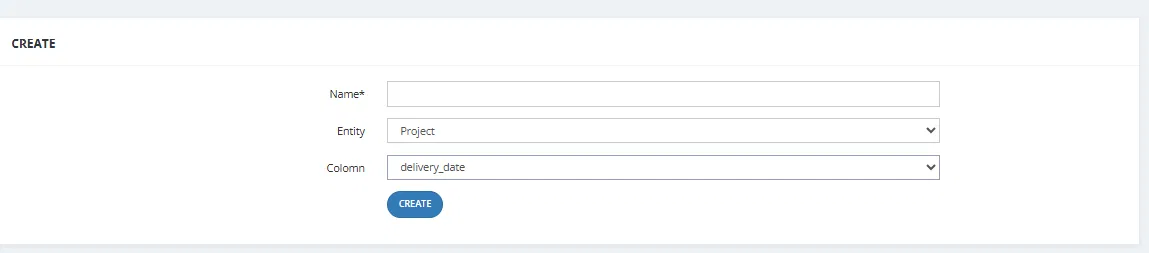
- Go to Setup → Global Contracts → Document Words.
- Click Add New +.
- Fill in the fields:
| Field | Required | Description |
|---|---|---|
| Name | ✅ | A label for this placeholder (e.g., "Unit Delivery Date"). This becomes the code name. |
| Entity | Optional | The data source — choose from: Project, Building Segment, or Unit. |
| Column | Optional | The specific field to pull from that entity (e.g., delivery_date, total_price, floor). |
- Click Create.
When a document is downloaded, the system finds the reserved unit, reads the value of the specified Column from the selected Entity, and replaces the code with that value.
💡 Example: Entity = "Unit", Column =
delivery_date→ insert its code in the Reservation Form → the client's unit delivery date prints automatically when downloaded.
Context-Dependent Codes
Some codes output different values depending on which stage the unit is at when the document is downloaded, and which document type is being used. Understanding this is important for building templates that always show the right information at the right time.
Payments List Before Contract vs. Contract Payments List
These two codes are designed for different document types and stages:
| Code | Use In | What It Shows |
|---|---|---|
-payments_list_before_contract- |
Reservation Form | All installments due before the contract stage — down payments and quarterly installments before delivery. Does NOT include post-delivery installments. |
-contract_payments_list- |
Contract | The full detailed financial breakdown table (Unit info, all installments, maintenance, totals). Only meaningful after the contract stage. |
⚠️ Using
-contract_payments_list-in a Reservation Form will output the placeholder code text, not a table — because the full contract data is not yet available at the reservation stage.
Down Payment Behavior by Stage
The -down_payment- and -num_down_payment- codes behave differently depending on when the document is downloaded:
| Stage | -down_payment- Output |
|---|---|
| Reservation Form (before down payment is collected) | "صفر جنيه فقط لا غير" / "Zero pounds only" — because the down payment hasn't been collected yet. |
| Contract (after down payment is collected) | The actual down payment amount in text (e.g., "سبعمئة و ثمانية وثلاثون ألف..."). |
Similarly, -total_paid- at the Reservation stage shows "صفر" because nothing has been collected yet — it increases as payments are made.
Payment Method Down Payment vs. Down Payment
These two codes look similar but pull from different places:
| Code | What It Pulls From | Available In |
|---|---|---|
-payment-method-down-payment- |
The down payment amount as defined in the payment plan template (e.g., "عشرة آلاف جنيه فقط لا غير"). | Reservation Form only |
-payment-method-down-payment-en- |
Same as above, written in English (e.g., "Ten thousand pounds only"). | Reservation Form only |
-num-payment-method-down-payment- |
Same as above, as a plain number (e.g., 10,000.00). | Reservation Form only |
-down_payment- |
The actual down payment collected on the unit at the time of download. At Reservation stage outputs "صفر" since nothing collected yet. | Reservation + Contract |
-num_down_payment- |
Same as above, as a number. | Reservation + Contract |
Reservation Serial Number
-reservation_serial_number- outputs the auto-generated serial number for the reservation (e.g., "26"). This is available at the Reservation stage.
Broker Contract Serial
-Broker_contract_Serial- outputs the auto-generated contract serial number for broker contracts (e.g., "3"). This is specific to the Broker Contract document type.
Selling Salesman Hierarchy
The selling salesman codes pull from the Hold step assignment, not the lead assignment:
| Code | Example Output | Description |
|---|---|---|
-selling_salesman- |
"Sales Agent" | The salesman who held the unit. |
-selling_salesman_parent- |
"KO" | Their direct manager. |
-selling_salesman_grandparent- |
"Admin" | Two levels up in the hierarchy. |
These differ from -lead_salesman- (who the lead was assigned to) — the same unit could have different lead and selling salesmen.