
Client Requests
Overview
The Client Requests module is used to create and manage requests submitted on behalf of clients. This covers delivery inquiries, financial requests, service issues, and more. Requests are routed to the relevant department for handling.
Request Information
All requests are displayed in a table with the following columns:

| Column | Description |
|---|---|
| Client | The client associated with the request. |
| Title | A brief summary of the request. |
| Content | A short description of the request details. |
| Department | The department assigned to handle the request. |
| Assigned User | The team member responsible for managing the request. |
How to Create a New Request
- Click Add New.
- Fill in the required fields:
| Field | Required | Description |
|---|---|---|
| Client | ✅ | Select the client associated with this request. |
| Title | ✅ | A brief, descriptive title for the request. |
| Content | ✅ | Full description of the client's request or issue. |
| Department | ✅ | Choose the department that should handle it. |
| User | ✅ | Assign a team member to manage the request. |
| Files | Optional | Upload supporting documents. |
| Images | Optional | Upload any related images. |
- Click Create to submit the request.
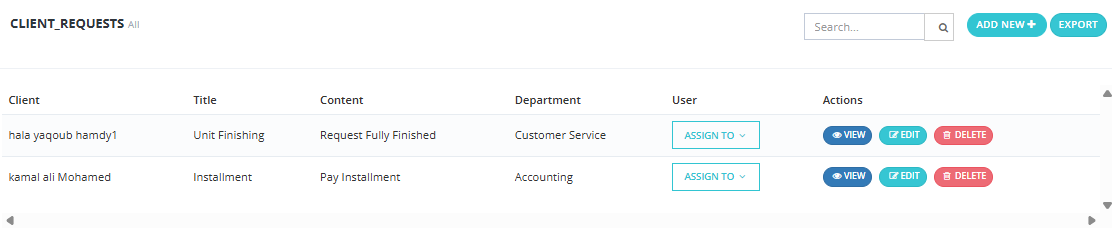
Available Actions
- Search Requests — Find requests by client name, title, or keyword.
- Edit Request — Modify the request's details or status.
- Delete Request — Remove a request if no longer relevant.
- Reassign Request — Move the request to a different department or user.
- Track Request Progress — Monitor the status of each request from the table.