Client Details
Overview
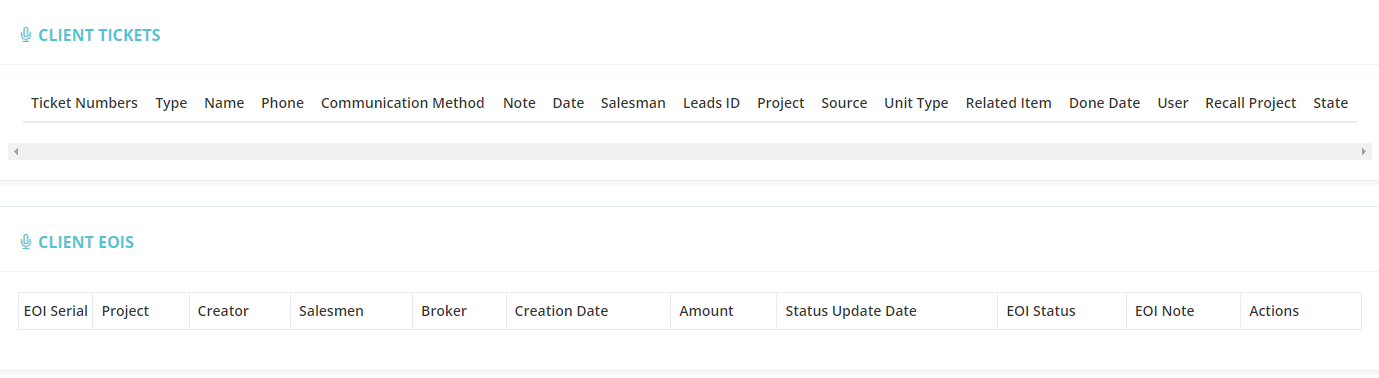
Clicking on a client's name opens the Client Details page — a full view of all information, history, and actions related to that client.
Client Information Fields
| Field | Description |
|---|---|
| Client ID | Unique identifier assigned to the client. |
| Name (Arabic) | Client's name in Arabic. |
| Name (English) | Client's name in English. |
| Mobile | Contact number. |
| Email address. | |
| Broker / Broker Agent | If referred by a broker or agent, their details appear here. |
| Sales Team | The salespeople responsible for this client, with their contact info. |
| Notes | Any notes recorded about the client. |
| Files / Private Files | Upload and view documents related to the client. |
Available Actions from the Client Profile
| Action | Description |
|---|---|
| Client Update History | View a log of all changes made to the client's profile. |
| Sell Unit | Start the unit sale process for this client. |
| Add EOI | Register an Expression of Interest for a unit. |
| Payment History | View all payment transactions linked to this client. |
| Client History | Review the full interaction history with this client. |
| Unit Actions History | Track all updates and interactions related to units the client is interested in. |
| Create Client Requests | Submit a new request on behalf of the client. |
| View Client Tickets | See all support tickets linked to this client. |
| View Client EOIs | See all Expressions of Interest submitted by or for this client. |
Client Tickets
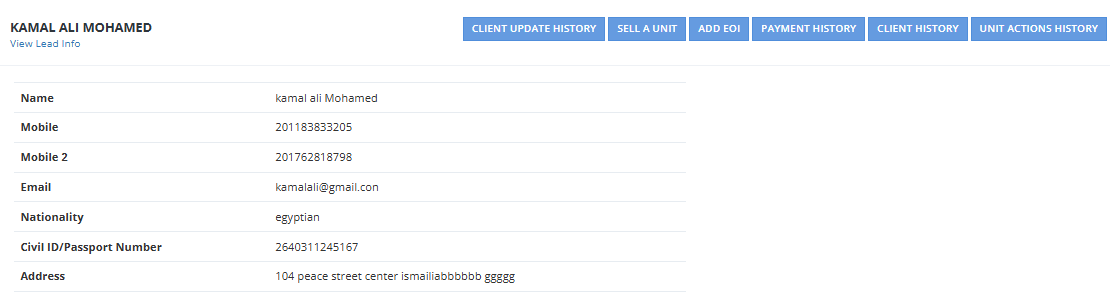
Scrolling down, you'll find a list of all support tickets related to this client, showing:
- Ticket Number
- Type
- Name
- Phone
- Communication Method
Client EOIs (Expression of Interest)
Also visible on this page — all EOIs submitted for this client, showing:
- EOI Serial
- Project
- Creator
- Salesperson
- Broker
- EOI Status