Activities Management
Overview
The Activities Management tab lets you log and track activities with broker companies — such as workshops, site visits, orientations, and contract signings.
Activities List
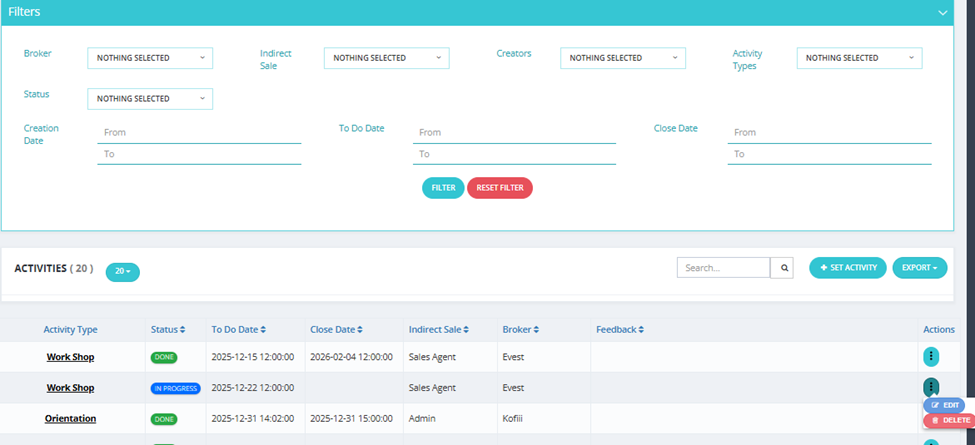
| Column | Description |
|---|---|
| Activity Type | The type of activity (e.g., Work Shop, Orientation, Site Visit, Contract Sign). |
| Status | Current status (Done, In Progress, etc.). |
| To Do Date | Scheduled date for the activity. |
| Close Date | Date the activity was closed/completed. |
| Indirect Sale | The salesman associated with this activity. |
| Broker | The broker company this activity is for. |
| Feedback | Any feedback recorded for this activity. |
| Actions | Edit or Delete the activity. |
Available Filters
| Filter | Description |
|---|---|
| Broker | Filter by broker company. |
| Indirect Sale | Filter by assigned salesman. |
| Creators | Filter by who created the activity. |
| Activity Types | Filter by activity type. |
| Status | Filter by activity status. |
| Creation Date | Filter by when the activity was created (From / To). |
| To Do Date | Filter by scheduled date (From / To). |
| Close Date | Filter by completion date (From / To). |
How to Set a New Activity
Click Set Activity and fill in:
| Field | Required | Description |
|---|---|---|
| Activity Type | ✅ | Select the type (e.g., Workshop, Site Visit, Orientation, Contract Sign). |
| Status | ✅ | Current status of the activity. |
| Todo Date | ✅ | Scheduled date and time. |
| Reminder Date | ✅ | When to send a reminder. |
| Broker | ✅ | Select the broker company. |
| Indirect Sale | ✅ | Select the indirect sales team member. |
| Feedback | Optional | Notes or feedback about the activity. |
| Activity Image | Optional | Upload an image related to the activity. |
| Check-in | Optional | Log a check-in for this activity. |
Activity Types Setup
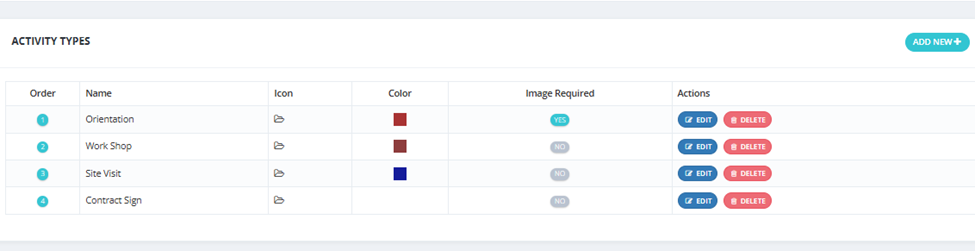
Activity types are configured via Setup → Broker Activity. Each type has:
- Order — Display order.
- Name — Type name (e.g., Orientation, Work Shop, Site Visit, Contract Sign).
- Icon — Visual icon.
- Color — Color label.
- Image Required — Whether an image must be uploaded for this activity type.