
Primary Units — Project Units History
Overview
The Project Units History tab provides a complete audit log of all actions taken on all primary units — across all projects and phases. Use it to track every show, hold, contract, price change, and any other activity on any unit.
What You See
| Column | Description |
|---|---|
| Client | The client associated with the action. |
| User | The CRM user who performed the action. |
| Unit | The unit the action was performed on. |
| Action | The type of action (e.g., Show, Hold, Contract, Change Price). |
| Action Date | The date the action was set to take effect. |
| Note | Any note recorded with the action. |
| Creation Date/Time | When the action was logged in the system. |
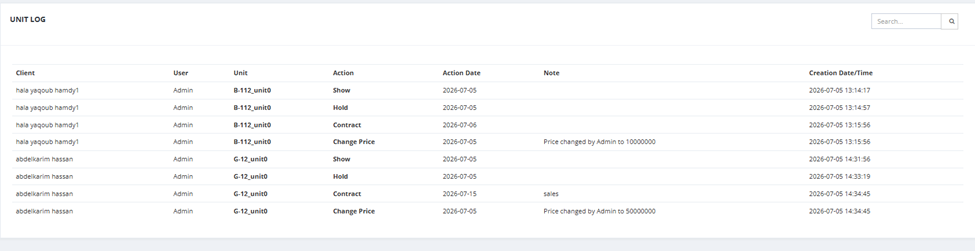
Available action: Search.
Available Filters
| Filter | Description |
|---|---|
| Date | Filter by date range (From / To). |
| Project | Filter by project. |
| State | Filter by pipeline state (Show, Hold, Contract). |
| Unit | Filter by unit name. |
| Client | Filter by client name. |
💡 Use Project Units History to investigate what happened to a specific unit, verify when a deal was confirmed, or review a salesman's activity across all primary units.