
Rotation
Overview
The Rotation feature automates how leads are distributed across the sales team. Instead of manually assigning each lead, the system can rotate leads evenly or based on conditions.
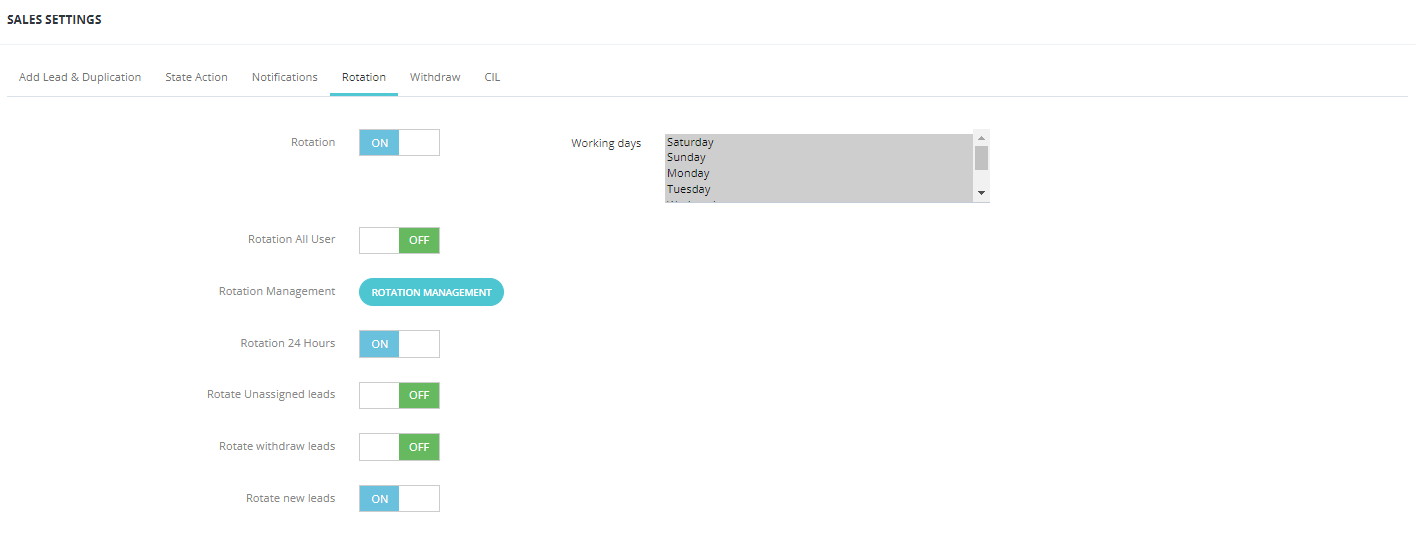
Rotation Options
| Option | Description |
|---|---|
| Rotation All Users | Rotates leads among all active salesmen. |
| Rotation Management | Rotates leads to specific users only (selected manually). To configure which users are included, go to Setup → Rotation Management. |
| Rotation 24 Hours | Runs the rotation continuously, 24/7, including outside working hours. |
Lead Rotation Types
| Type | Description |
|---|---|
| Rotate Unassigned Leads | Automatically assigns leads that have no salesman assigned. |
| Rotate Withdrawn Leads | Reassigns leads that were withdrawn back into the sales pipeline. |
| Rotate New Leads | Distributes newly created leads evenly among the team. |
Rotation Conditions
You can add custom conditions to control how leads are rotated:
| Condition | Description |
|---|---|
| Type | The category or type of lead to rotate. |
| Item Value | The specific value to match. |
| Salesman | Which salesman receives these leads. |
| Role | Rotate based on user role. |
| Quota | How many leads each salesman receives per rotation cycle. |
| Interval | Time interval between each rotation assignment. |
Working Days
Configure which days of the week rotation is active to match your team's schedule.
Key Things to Know
- Rotation runs automatically based on the rules you configure — no manual action needed.
- Leads go to the salesman's Fresh Leads tab after rotation.
- Use Rotation Management if you want to control exactly who receives which leads.