
Withdraw
Overview
The Withdraw settings control when leads are automatically taken back from a salesman due to inactivity. Withdrawn leads move to Lead Stock and can be reassigned.
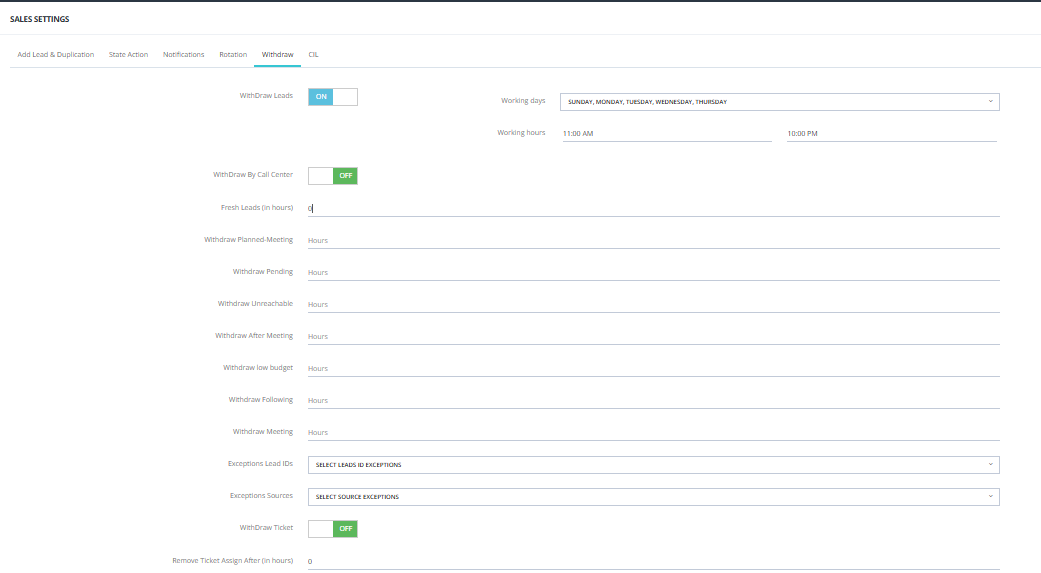
Main Switch
| Setting | Description |
|---|---|
| Withdraw Leads | Master ON/OFF switch for the entire withdraw feature. |
| Working Days | Which days of the week the withdraw rules apply (e.g., Sunday–Thursday). |
| Working Hours | The time window during which withdraw rules are active (e.g., 11:00 AM – 10:00 PM). |
Withdraw Settings
| Setting | Description |
|---|---|
| Withdraw by Call Center | When ON, allows the call center team to manually withdraw leads from salesmen. |
| Fresh Leads (in hours) | How long a lead can sit in Fresh Leads without action before being withdrawn. |
Withdraw by State
Set specific withdrawal timeframes per lead state. Leave blank to disable withdrawal for that state.
💡 Only states that have a Next Action Date set will appear here. States without a next action date will not show up in this section.
💡 Only states that have a Next Action Date set will appear here. States without a next action date will not show up in this list.
| State | Setting |
|---|---|
| Planned Meeting | Hours of inactivity before withdrawal. |
| Pending | Hours of inactivity before withdrawal. |
| Unreachable | Hours of inactivity before withdrawal. |
| After Meeting | Hours of inactivity before withdrawal. |
| Low Budget | Hours of inactivity before withdrawal. |
| Following | Hours of inactivity before withdrawal. |
| Meeting | Hours of inactivity before withdrawal. |
Exceptions
| Setting | Description |
|---|---|
| Exceptions Lead IDs | Leads with these Lead IDs will not be withdrawn, even if inactive. |
| Exceptions Sources | Leads from these sources will not be withdrawn automatically. |
Ticket-Related Withdraw
| Setting | Description |
|---|---|
| Withdraw Ticket | When ON, leads associated with a support ticket can be withdrawn. |
| Remove Ticket Assignment After (hours) | How long before the ticket assignment is removed automatically. |
How Withdraw Works with Delay Notifications
The system follows this sequence:
- Lead becomes inactive (no action taken).
- Delay notifications start firing — alerting the salesman and manager (configured in Notifications Settings).
- Once the withdraw timer expires, the lead is automatically withdrawn and moved to Lead Stock.
💡 Set your delay hours to be less than your withdraw hours so the salesman gets a warning before the lead is taken away.
Key Things to Know
- Withdrawn leads move to Lead Stock — they are not deleted.
- From Lead Stock, they can be reassigned manually or via Rotation.
- Withdraw rules only apply during the configured working days and hours.
- Use Exceptions to protect important lead sources or campaigns from being auto-withdrawn.